The first website I ever built was a single white page with a blue heading and my name typed in the middle. I opened it in a browser, pressed refresh about forty times, and still could not believe that the code I wrote in a plain text file was actually rendering on a screen. That small, slightly ugly page is where my programming learning started — and it eventually led me to a career in full-stack web development.
This post is the honest version of that journey: what I read, what I practised, where I got stuck, and what I would do differently today. Whether you are a beginner deciding how to learn to code, a career switcher weighing a move into tech, or a hiring manager trying to understand what a real development background looks like, this learning journey should give you a useful map.
Why I Started My Programming Learning With a Book
When I decided to learn web development, I did exactly what most people do: I opened twenty browser tabs, watched four unfinished video courses, and saved a folder full of bookmarks I never reopened. Progress was slow because nothing was sequenced.
So I changed tactics. I bought a single physical resource — Complete Web Design and Development, available on Rokomari — and I gave myself one rule: finish the book, chapter by chapter, before collecting anything new.
The book that made the difference
That book provided a comprehensive guide to the fundamentals of web development. It started with markup, moved into styling, introduced programming logic, and finished with the pieces needed to publish a real site. Because everything lived in one place, I stopped hopping between tutorials and started building a mental model of how the web actually works.
Why one structured resource beats a hundred bookmarks
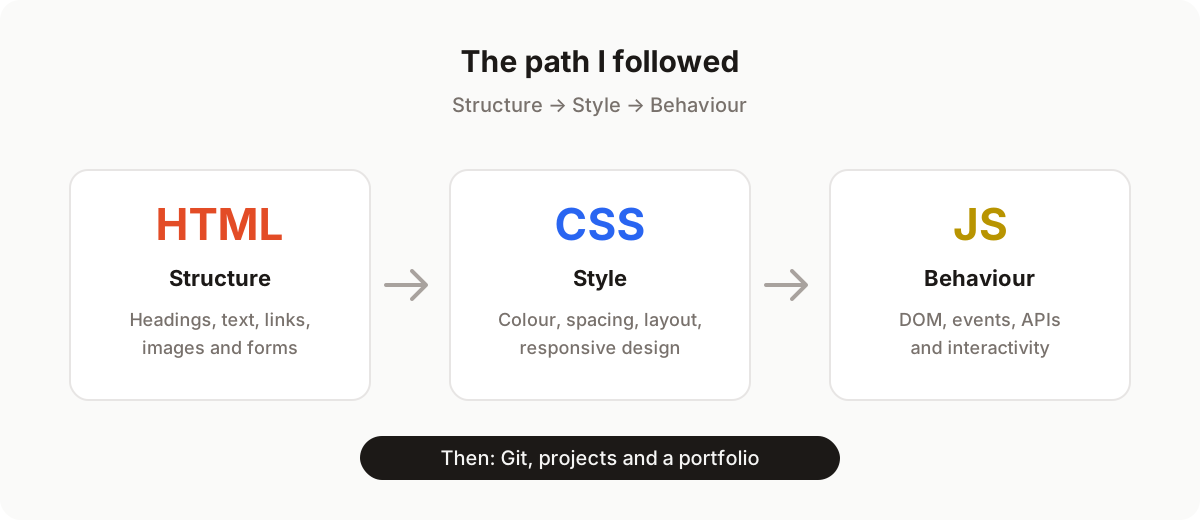
A book forces sequencing. You cannot style a page you have not structured, and you cannot add behaviour to a page you cannot style. That order — HTML, then CSS, then JavaScript — is not an arbitrary teaching trick. It mirrors how browsers actually interpret a document, and following it meant every new lesson stacked on something I already understood.
The fastest way to slow down your learning is to keep starting over with a new resource.
Stage 1: HTML and the Moment It Clicked
HTML felt unfamiliar for about two days. After that, it clicked, because HTML is really just structured writing. Headings, paragraphs, lists, links, images, forms — every element is a label that tells the browser what a piece of content means.
<article>
  <h1>My first web page</h1>
  <p>I built this while learning HTML.</p>
  <a href="/about.html">About me</a>
</article>
That semantic mindset changed how I read every website I visited. Instead of seeing a finished design, I started seeing outlines: navigation here, an article there, a footer at the bottom. Within a couple of weeks I had rebuilt the structure of three sites I admired as clean, semantic HTML — no styling, just honest markup.
If you are starting in web development, spend your first two weeks here and resist the urge to jump ahead. Solid HTML is the single biggest long-term investment you will make in front-end development.
Stage 2: CSS and Learning to Think Like a Designer
If HTML was writing, CSS was drawing. My early stylesheets were messy — dozens of class names, inline colours, and !important declarations used like duct tape. Slowly, I learned that CSS is a system, not a pile of rules.
Boxes, boxes everywhere
The breakthrough was the box model. Once I understood that every element is a rectangle with content, padding, border, and margin, layout stopped feeling like magic and started feeling like arithmetic.
From float hacks to Flexbox and Grid
I learned CSS in the era when centring a div was a genuine rite of passage. When I finally sat down with Flexbox and Grid, entire categories of problems disappeared. Two layouts now cover most of what I build:
.layout {
  display: grid;
  grid-template-columns: repeat(auto-fit, minmax(260px, 1fr));
  gap: 1.5rem;
}

.nav {
  display: flex;
  align-items: center;
  justify-content: space-between;
}
Responsive design came next: media queries, fluid type, and the habit of checking my work at 320px, 768px, and 1440px wide. Suddenly my pages worked on my phone, not just on my laptop.
Milestone: Shipping My First Website
About six weeks in, I bought a cheap domain, learned what a hosting control panel was, and uploaded my files over FTP. Seeing my own site at a real URL — accessible to anyone — was the moment web development stopped being a hobby exercise and started feeling like a craft.
That first deployment also taught me my first debugging lesson: a missing slash in a file path breaks everything, and browsers cache more aggressively than you expect. I have shipped hundreds of features since then, but I still feel a small version of that same buzz every time a release goes live.
Stage 3: JavaScript, Where Pages Come Alive
HTML gave my pages a voice and CSS gave them a look. JavaScript gave them a pulse. Learning programming with JavaScript was a genuine step change: for the first time, I was writing logic — variables, conditions, loops, functions — instead of only describing content and presentation.
DOM manipulation changed everything
The first concept that opened up a whole new world was DOM manipulation. Selecting an element, changing its text, adding a class, creating a node from scratch — these small actions add up to every interactive interface on the modern web.
const button = document.querySelector("#subscribe");
const status = document.querySelector("#status");

button.addEventListener("click", () => {
  status.textContent = "Thanks for subscribing!";
  button.disabled = true;
});
Ten lines of code, and a static page started responding to people. I was amazed at how I could manipulate the DOM and create engaging user experiences from scratch.
Events, state, and real user experience
After the DOM came events, form validation, fetching data from APIs, and the hard part: organising code so it stays readable as it grows. I rebuilt the same small projects — a todo app, a weather widget, a quiz — each time with a cleaner structure. That repetition, not any single tutorial, is where the programming finally stuck.
What This Learning Journey Taught Me About Learning to Code
Three lessons survived every project I have worked on since:
- Consistency beats intensity. Ninety focused minutes a day outperformed one heroic weekend every time.
- Build, break, rebuild. I learned more from a broken stylesheet I fixed myself than from any walkthrough.
- Read other people’s code. Open-source projects taught me naming, structure, and testing habits no beginner tutorial covered.
Why This Story Matters to Recruiters and Business Owners
For hiring managers, HR professionals, and small business owners, a learning journey like this translates into practical signals:
- Fundamentals-first foundations. Developers who learned HTML and CSS properly tend to write accessible, maintainable, SEO-friendly markup — the kind that avoids expensive rework later.
- Evidence of self-direction. Finishing a book and shipping a live site without a instructor is a reliable indicator of the discipline remote and small teams depend on.
- Breadth with depth. According to W3Techs, around 98% of websites use JavaScript on the client side, and roughly three-quarters of sites with a known server-side language run PHP. A developer comfortable across HTML, CSS, JavaScript, and a server-side stack can own a feature end to end instead of passing it between three people.
- Compounding experience. Stack Overflow’s developer surveys have listed JavaScript among the most commonly used languages for over a decade. The basics never expired — the same HTML and CSS foundations I learned years ago still underpin every framework built since.
In short: a candidate or contractor who mastered the fundamentals and kept shipping is lower risk than one who only knows a single framework’s abstractions.
A Practical Roadmap If You Are Starting Today
If you want to follow a similar path, here is the compressed version of what worked for me:
| Phase | Focus | Outcome |
|---|---|---|
| Months 1–2 | HTML + CSS fundamentals | Three responsive static pages |
| Month 3 | JavaScript basics + DOM | Interactive forms and small widgets |
| Month 4 | APIs, Git, and tooling | A data-driven project on GitHub |
| Month 5 | A real project from idea to deploy | A live site on your own domain |
| Month 6 | Portfolio, cleanup, and interviews | A presentable body of work |
Three rules make the plan work: build something every week, deploy early rather than perfectly, and finish projects before starting new ones.
Conclusion: Start With One Page
My web development journey did not begin with a bootcamp, a computer science degree, or an expensive course. It began with one book, one plain text editor, and one very simple page that I refreshed forty times in a row. HTML taught me how the web is written, CSS taught me how it is designed, and JavaScript taught me how it thinks — and each stage made the next one obvious.
Ready to start, or hiring someone who has? If you are beginning your own learning journey, open a text file and write your first <h1> today. And if you are building a product and need a full-stack engineer who learned the fundamentals the hard way, get in touch — I am happy to talk about your project, or point you to more writing on my blog.